
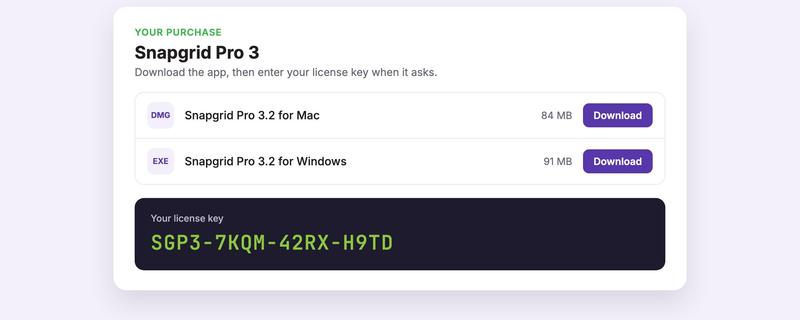
If you make software, you need two things from a store: a way to deliver the download and a way to hand each buyer a license key. DPD does both. The buyer pays, gets the installer and their key by email and on their download page, and you don’t touch a thing.
Here’s how to set it up.
Turn on keycode products
Keycode products are switched off on new DPD accounts. To turn them on, contact our help desk with your store’s URL and a line about what you’ll sell. Once they’re on, you’ll see two new product types when you create a product:
- Digital product with keycode. A file plus an activation key. This is the one for most apps, plugins and installers.
- Keycode only / URL. Just a key or a link, with no download. For unlock codes, upgrade codes and other things that don’t need a file.
Choose where your keys come from
DPD gives you four ways to supply keys.
Keys you upload
Generate a batch of keys yourself and paste them in, one per line. DPD hands out the next unused key with each sale.
This is the simplest option, and it works with any licensing system. The catch is running out. DPD warns you when your keys look set to run out within 7 days at your current sales rate, and you can set your own threshold. You also choose what happens when the list is empty: stop selling the product until you add more keys, or keep selling anyway.
Your key-generation URL
If you have a server that makes keys, DPD can ask it for one at the moment of each sale. DPD sends your URL the buyer’s name and email and the product and order IDs, and your server replies with the key on a single line.
This suits keys tied to the buyer’s name or email, and you never run out. To keep your URL private, put a username and password in it, like https://user:password@example.com/keys. There’s a button on the product to test your URL before you go live.
One key for everyone
The same key, or the same link, for every buyer. Handy for a shared unlock code, or a link to a private download area.
Aquatic Prime
If your Mac app already uses Aquatic Prime licensing, DPD can generate those license files for you from your public and private keys.
Deliver the key as a file
Some apps read their license from a file. Turn on Deliver the key as a file and DPD gives the buyer their key as a download, under the file name you choose.
Ship updates to past buyers
You’ll release new versions. When you upload a new installer, DPD can send a product update with fresh download links to past buyers. You pick the time frame, so you can give free updates to people who bought in the last year and leave older buyers to buy an upgrade.
Sell upgrades and bundles
Bundles let you combine products under one price. A few ways software sellers use them:
- Sell an app and its add-ons separately, and all of them together for less
- Sell a license plus a support plan as one item
- Sell a download with a boxed copy you ship
DPD delivers every file type, from .dmg and .exe to .zip, .deb and .rpm, with no file size limits.
Sell it on your own site
Put product cards and add to cart buttons on your app’s own website, so buyers never leave your site to find the checkout page. Our demo page shows how that looks on a working store, and selling software with DPD sums up the rest.
What it costs
DPD plans start at $10 a month with no fee per sale, and you pay your payment processor directly. SendOwl, another popular choice for software, starts at $39 a month. Our SendOwl comparison goes through both side by side.
Questions people ask
Can a buyer see their key again later?
Yes. The key is on their download page as well as in their purchase email, and you can resend the purchase email from the DPD admin.
Can I sell keys without a download?
Yes, that’s the “keycode only” product type. The buyer gets just the key or link.
What happens if I upload duplicate keys?
DPD adds every line as its own key, duplicates included, so check your list before you paste it in. The key list for each product in the DPD admin shows when each key was added and which purchase used it.
Do I need my own licensing system?
No. With uploaded keys, any list of codes works. Your app only has to check whether a key is one you made.