
AI assistants like Claude, ChatGPT and Cursor can write the code that puts your DPD products on your own website. They can also write scripts that pull your sales out of DPD for a report. The trick is to give them DPD’s developer docs first, so they work from the real code and don’t guess at it.
What an AI assistant can do for your store
Here are a few jobs you can hand to an assistant:
- Add product cards, add to cart buttons and a cart to the pages of your site
- Make those match your site’s fonts and colors
- Move your older DPD buy buttons over to the new cart, one page at a time
- Write a script that lists last month’s purchases, or checks whether someone has an active subscription
You don’t need to be a developer for the first two. If you can paste a prompt into a chat and paste the code you get back into your site, you can do this.
Start with DPD’s llms.txt
Our developer docs have a page for using DPD with AI agents. It lists a few plain text files written for AI tools to read:
- llms.txt is an index: what DPD is, the facts an assistant needs to get our code right, and links to everything else. Start here.
- llms-full.txt is every page of the docs in one file. It’s handy when your tool lets you attach a file but can’t open links.
- openapi.yaml describes the DPD REST API: every endpoint, parameter and field. Use it when you want code that reads your store’s data.
An assistant that hasn’t read these is working from whatever it picked up in training, and it may not know about DPD’s newer embed components at all. One link in your prompt fixes that.
A prompt for adding your products
Copy this prompt, then swap in your own store and product:
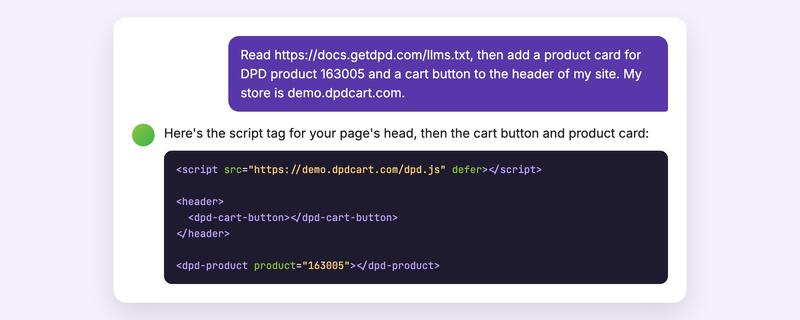
Read https://docs.getdpd.com/llms.txt, then add a product card for DPD
product 163005 and a cart button to the header of my site. My store is
demo.dpdcart.com.
Your store is the address of your DPD cart, like yourstore.dpdcart.com. You’ll find each product’s ID in the DPD admin, and on the product’s button code page under the components tab.
There’s one step the assistant can’t do for you. DPD’s cart only works on websites you’ve allowed, and your store’s website (the one in your store settings) is allowed already. If you’re adding products to a different domain, add it in the DPD admin under Settings > Checkout > Embed domains. Until you do, the products on that site will say “This store’s cart isn’t available on this website.” If your assistant tests your site on your own computer, add localhost to that list too.
Want to see what you’ll end up with? Our demo page shows the product cards and cart on a working store.
A prompt for your sales data
Using https://docs.getdpd.com/openapi.yaml, write a script that lists
yesterday's purchases from the DPD API. Read the username and API
password from environment variables.
The DPD API is read-only, apart from one call that emails a customer their downloads again. A script can read your storefronts, products, purchases, customers and subscribers, but it can’t change them. It signs in with your DPD username and the API password from your profile in the DPD admin, which is different from the password you sign in with.
Keep your API password out of the chat
Don’t paste your API password into the conversation. Ask the assistant to read it from an environment variable or a secrets file, and set that up yourself.
Your API password also can’t go in code that runs in your visitors’ browsers, where anyone can read it. Calls to the DPD API belong on a server. The embed components don’t need a password at all, so the code for your product pages is safe to publish.
Which AI tools work
Any assistant that can read a web page or a file you give it. The prompts above work in Claude and ChatGPT, and in coding tools like Cursor and Claude Code that can edit your site’s files directly. If your tool can’t open links, download llms-full.txt and attach it, or paste in just the part you need.
Questions people ask
Do I need to know how to code?
Not to add products to your site. You’ll need to paste the code your assistant writes into your pages, or into the custom code area your site builder gives you. For API scripts, it helps to know how to run a script on your computer or server, and your assistant can walk you through that too.
What if the code doesn’t work the first time?
Open the page in your browser and tell the assistant what you see. If the products say the cart isn’t available on this website, check the embed domains setting above. Your browser’s developer console also shows a message from DPD naming the domain to add.
Do the old DPD buy buttons still work?
Yes. The classic buy button codes still work, and the docs cover both. If you ask an assistant to move a page over to the new components, it can do it one button at a time.
Where can I see every file for AI tools?
On the AI agents page of our developer docs. For everything else about the embed components and the API, start at docs.getdpd.com.